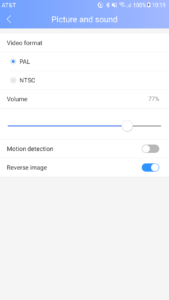
My camera image is upside down Post author:Jesse Post published:03/19/2018 Post category:IDoorBell Fon In the YooSee App, go to Settings > Picture and Sound and toggle the “Reverse Image” option on or off. Tags: Camera, DP68, IDoorBell Fon, YooSee Read more articles Next PostI’m trying to switch my network connection from Ethernet to WiFi, but it won’t let me! You Might Also Like 4. IDoorBell + Phone Setting – 01/02/2020 New Sharing Unlock feature Firmware for DP-68 IDoorBell Fon 05/10/2019 Notified by App also with Email MMS SMS 04/10/2018